
An IPTV box is a small device that connects to your TV via HDMI. You can connect this box to your home internet and stream live channels, movies & series, and VOD. Just install the IPTV player on the box, buy an IPTV subscription, add your subscription details to the player, and you are ready to go.
IPTV boxes are faster, have more storage for catch-up, and offer better performance. IPTV boxes are also used with smart TVs. Boxes are much faster than sticks or smart TVs and give a smoother and better experience. When you connect an IPTV box to a TV, you can download all streaming apps onto your TV and stream content. You can download Netflix, Amazon Prime, Hulu, HBO Max, IPTV players, and all other streaming apps.
The IPTV box is just a hardware translator. It doesn’t have pre-loaded channels. You need to buy an IPTV subscription to watch live streams. If you want to buy an IPTV subscription, give IPTVEXPERT a chance, and you will never regret it. If you wanna fully understand IPTV then read our article on What is IPTV.
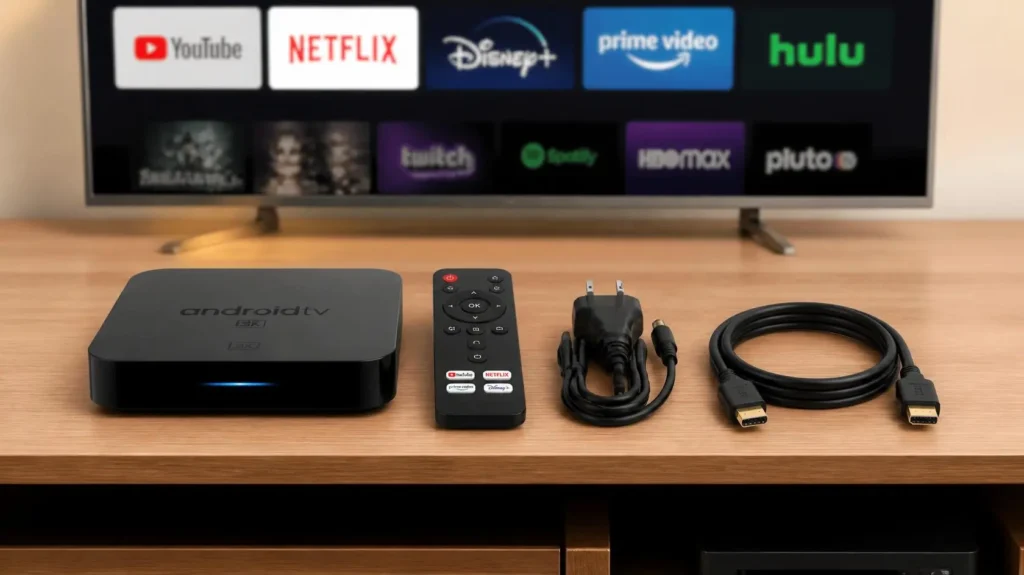
What is an IPTV box?
IPTV Box is a small device (box type) that is connected to your TV via an HDMI port. Plug the box into your TV, and it will convert your normal TV into a smart TV. You can connect to your home internet connection and stream content on your TV.
You can download streaming apps to your TV box and explore the web. It is like a computer, but with fewer features than a computer. An IPTV box enhances the quality of streaming and reduces lagging and buffering.
Why an IPTV set-top box?
The IPTV set-top box has a higher speed than other sticks or ordinary smart TVs. There are the following reasons an IPTV box is a better choice.
- Bypass the need for traditional cable or a dish, which costs much more than an IPTV subscription.
- Smart TV menus become slower over time and lag. On the other hand, an IPTV box has a much faster processor, smooth EPG navigation, and regular firmware updates.
- IPTV boxes handle modern high-efficiency video codecs like 4K smoothly.
- IPTV boxes can convert traditional non-smart TVs into streaming-capable smart TVs.
Why an IPTV box for smart TVs that support IPTV players
Smart TVs can run IPTV apps and other streaming apps, but they lack durability, and their performance declines over time. Their processors are slower and slow down further over time. They can lack modern video codecs like 4K and H.265/HEVC.
On the other hand, IPTV boxes have much faster processors, and their performance stays consistent over time. They can easily handle modern high-quality codecs efficiently.
Note: IPTV is not necessary for smart TVs. Smart TVs give a much better experience. Smart TV’s new models have improved everything. But if you want to take the performance and quality of streaming to the next level, consider a set-top box. Otherwise you can setup IPTV on smart TV without any need of set-top box.
Types of IPTV boxes. Which is the best one?
There are alot of IPTV boxes on the market, and all are pretty good. I’m going to mention a few of the best ones below, including their models.
Formular box: models of the Formular box and the best one.
The formula is an Android-based IPTV box, and the Z12 Ultra SE is the
| Model Variant | Base Operating System | Internal Hardware Memory | Notable Video Standards |
| 🥇 Z12 Ultra SE (Best Model) | Android 12 | 2GB RAM / 64GB Storage | Dolby Vision, Atmos, 4K @ 60fps |
| 🥈 Z11 Pro Max | Android 11 | 4GB RAM / 32GB Storage | 4K @ 60fps, Realtek RTD1319C |
| 🥉 Z mini | Android 12 | 2GB RAM / 8GB Storage | 4K @ 60 fps, ultra-compact dongle |
BuzzTV box: Which is the best model of BuzzTV?
The BuzzTV box is also an Android-based set-top box, and Power Station 6 is the best model of BuzzTV so far.
| Model Variant | Base Operating System | Internal Hardware Memory | Standout Hardware Trait |
| 🥇 Power Station 6 (Best Model) | Android 13 | 32GB DDR5 / 256GB Storage | Internal M.2 NVMe SSD Expansion Bay |
| 🥈 X5 AX-C | Android 11 | 4GB RAM / 128GB Storage | High-Gain Dual External Wi-Fi Antennas |
| 🥉 E5-SE | Android 11 | 2GB RAM / 32GB Storage | Budget-focused setup with smart remote |
NVIDIA Shield IPTV box.
The NVIDIA Shield is another Android-based model, and the best one is the Shield TV Pro.
| Model Variant | Base Operating System | Internal Hardware Memory | Standout Hardware Trait |
| 🥇 Shield TV Pro (Best Model) | Android TV 11 | 3GB RAM / 16GB Storage | AI-Powered 4K Video Upscaling |
| 🥈 Shield TV “Tube” | Android TV 11 | 2GB RAM / 8GB Storage | Space-saving cylindrical layout |
MAG (Infomir) IPTV box.
MAG boxes have both Linux and Android operating systems. The best model is MAG 544w3.
| Model Variant | Base Operating System | Internal Hardware Memory | Video & Network Speeds |
| 🥇 MAG 544w3 (Best Model) | Linux 4.9 | 1GB RAM / 4GB Storage | 4K UHD @ 60fps, Dual-Band Wi-Fi 5 |
| 🥈 MAG 555 | Android TV 11 | 2GB RAM / 16GB Storage | 4K UHD, App-friendly hybrid build |
| 🥉 MAG 322 | Linux 3.3 | 512MB RAM / 512MB Storage | 1080p Legacy hardwired model |
Google IPTV Box.
The Google IPTV box is also an Android-based model, and the best one is the Google TV Streamer model.
| Model Variant | Base Operating System | Internal Hardware Memory | Standout Hardware Trait |
| 🥇 Google TV Streamer (Best) | Android TV 14 | 4GB RAM / 32GB Storage | Integrated smart home panel + gigabit port |
| 🥈 Chromecast with Google TV | Android TV 12 | 2GB RAM / 8GB Storage | 4K HDMI puck form factor |
Amazon Fire TV Box and stick for IPTV.
Amazon Firestick has both a stick and a top box. An Amazon Fire TV Stick top box has more memory and also a faster processor than the Stick. On the other hand, a stick is portable and small.
IPTV Firestick is the most popular of all IPTV boxes. IT has two models. The newer model is Vega OS. It has totally banned IPTV apps. That’s why I didn’t mention Vega OS models in the list. If you want to buy a Fire TV top box, then the Fire TV Cube 3rd Gen is the best model so far.
I have a complete article on the Fire TV Stick. It contains all the tiny details about the Fire TV Stick, and a complete setup and installation guide.
| Model Variant | Base Operating System | Internal Hardware Memory | Wireless Connectivity |
| 🥇 Fire TV Cube 3rd Gen (Best) | Fire OS 8 | 2GB RAM / 16GB Storage | Wi-Fi 6E + HDMI Input pass-through |
| 🥈 Fire TV Stick 4K Max | Fire OS 8 | 2GB RAM / 16GB Storage | Wi-Fi 6E compact streaming stick |
TVIP S-Box for IPTV
TVIP S-Box operates on both Linux and Android operating systems. S-Box v.706, an Android-based model, is the best one.
| Model Variant | Base Operating System | Internal Hardware Memory | Network Hardware |
| 🥇 S-Box v.706 (Best Model) | Linux / Android 11 | 2GB RAM / 8GB Storage | 100M Ethernet + Dual-Band Wi-Fi 5 |
| 🥈 S-Box v.710 | Linux / Android 11 | 1GB RAM / 8GB Storage | 100M Ethernet Only (No Wi-Fi chips) |
Which is the best IPTV box?
Formular Z12 Ultra SE 64GB is the best IPTV box based on its specifications, hardware, and software.
In terms of popularity and customer response, the Fire TV Stick was the best, but now Amazon has banned IPTV apps on the new Vega OS model.
Now Android boxes are gaining popularity and receiving the best responses. All customers are now choosing Android boxes, and they are my favorite. They have no restrictions, a better-quality experience, and a better processor. Most IPTV users are switching toward Android IPTV boxes.
Certified Android & Google TV Boxes
Google TV boxes are also Android boxes. The difference is that Google TV boxes have a modern UI. The Android TV box UI is like smartphones and easy to use. I mentioned some of the best Android boxes that can elevate your IPTV experience to the next level. The best Android box is the NVIDIA Shield TV Pro.
| Model Variant | Base Operating System | RAM / Storage | Key Video Features | Distinctive Hardware Advantage |
| 🥇 NVIDIA Shield TV Pro (Best) | Android TV 11 | 3GB / 16GB | Dolby Vision, Atmos | AI-Powered 4K Upscaling & Dual USB 3.0 ports |
| 🥈 onn. 4K Pro (2026) | Google TV | 3GB / 32GB | Dolby Vision, Atmos | Hands-free voice assistant mic + full USB-A storage port |
| 🥉 Xiaomi TV Box S (3rd Gen) | Google TV | 2GB / 32GB | 4K HDR10+, DTS:X | Wi-Fi 6 wireless networking in a highly compact design |
| 🎖️ Xiaomi TV Box S (2nd Gen) | Google TV | 2GB / 8GB | Dolby Vision, HDR10+ | Highly affordable entry point for a stock Google system |
| 🎖️ MECOOL KM2 Plus | Android TV 11 | 2GB / 16GB | 4K HDR10, Dolby Audio | Fully Netflix 4K certified budget box architecture |
IPTV box setup: Set up and install the IPTV player, then add an IPTV subscription to the box.
IPTV box setup is completed in two simple steps. You can visit our IPTV setup guide page. It has a step-by-step guide for all devices.
- Download and install the IPTV Player (app).
- Add an IPTV subscription to the app.
I’m going to explain these two steps thoroughly.
Download and install the player on the IPTV Box.
The following download steps are common to all IPTV boxes.
- Plug in the IPTV box via an HDMI cable into your TV
- Connect to the wifi. The process of connecting to wifi is the same as on a mobile or laptop. Go to Settings, find the Internet or WiFi option, and enter the WiFi password.
App installation on Android and Google TV boxes.
- Go to the Play Store and download your favorite IPTV player app.
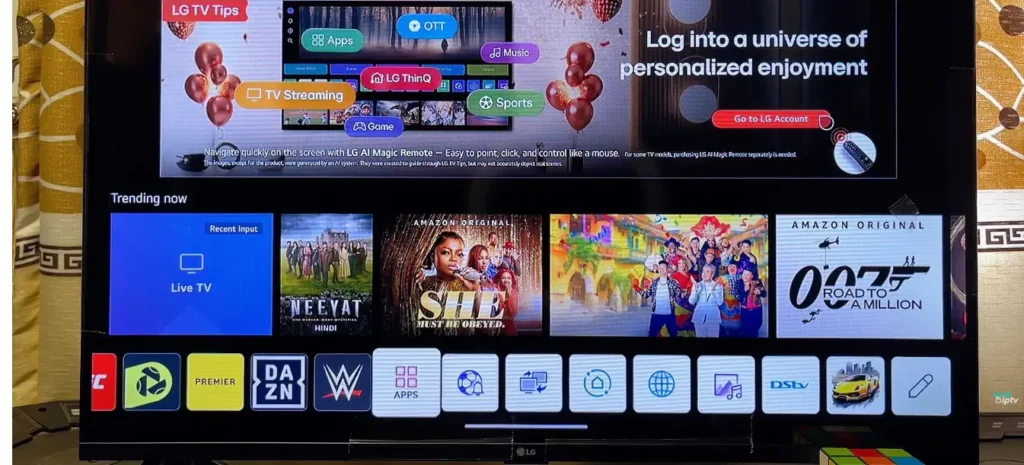
- Install the player on the TV and add an IPTV subscription to it.
The process of installing an IPTV player on a Fire TV Box is a little different from other devices. You can visit our dedicated page for the setup and installation of IPTV on Firestick. It has a step-by-step guide on IPTV setup.
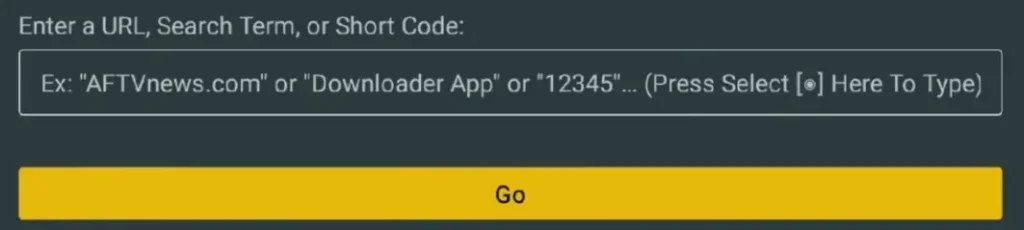
- Go to the search icon, search for the downloader app, download a downloader by AFT News, and install it.
- Open the downloader app and search for your favorite player, or enter the code of your favorite player. Click on Go, and downloading will start automatically.
Add an IPTV subscription to the IPTV Box.
You can add your IPTV subscription to the IPTV player in two ways.
- M3U URL Method 1 Yourself: You need to search for your player on Google. Open the official website of your player, click on the menu option, and search for “add playlist.” They’ll ask you for the MAC address and password. You can find the MAC address and password in your app. Log in, add the M3U URL, and save it. Restart your application, and it will take 2-3 minutes to load, and your playlist will be added.
- M3U URL Method 2: Your IPTV provider will add the playlist to your app. The second easiest method is sharing your MAC address with your IPTV subscription provider, and he will add the playlist for you. You just need to restart the device.
- Xtream API: If you are given Xtream API credentials, you just need to add the username, password, and URL into the app and click Add, and you are all set.
NOTE: You need to select the Xtream API login from the dashboard of your app.
List of favorite IPTV players for Smart TVs.
- 8K Pro
- 4K Cloud
- Tiviate 8K PRO
- Tivimate
- IPTV Smarters Pro: You can setup and install IPTV smarter pro yourself. Read our full guide on IPTV smarter pro setup and isntallation.
- B1G
- B1G Sky
- Sky Glass
- Sky Glass Infinity
- Golden OTT / Magnum OTT
- IBO Player
- G TV
- Zum TV
Best IPTV Subscription:
The best IPTV subscription so far is IPTVEXPERT premium bundles. We got the best customer response on the IPTV premium bundle. The renewal rate of our premium bundle is 97 percent. Almost every single customer came back. We always ask them for a review of their experience, and the best responses came from our premium bundles.
View our pricing plans and read our user reviews. Try our 24-hour free trial and decide for yourself. Give us a chance, and we will never disappoint you.
Getting started with IPTVEXPERT
You can get started with us in three simple steps.
Step 01:
Choose the bundle that suits you from our pricing plan and place an order. If you are uncomfortable sharing your details, then just contact us, and we’ll sort out everything privately.
Step 02:
Pay the bills. You can pay via WhatsApp as well. You will be given a local bank account, and you can transfer from your bank to ours via a simple everyday bank transfer. You can pay via card as well if you are comfortable.
Step 03:
Your subscription will be activated instantly, and you will get login details within minutes.
