
IPTV Setup Tutorials
Choose your device below and scroll down to see the installation guide
Fire TV
Fire stick, Fire cube, Roku stick, Mi stick, Xiaomi stick.
Android TV/Box/Google tV
Android Box, Android Stick

Formular/Dreamer
Formular Box/ Dreamer Box

Smart TV
Samsung, LG, Hisense, Bush Etc
Roku TV
Roku stick, Roku Devices

Apple iOS/TV
Apple Tv, iPhone, iPad, Tablet, Mac Book, Laptop
Windows mac
Laptop, Chrome, PC, Any window
Android phone
Android Phone, Android Tablet

Buzz TV Box
Buzz TV, Buzz box.

Mag box
Mag box, Mac address,
Firestick & Fire TV installation
IT takes only 3-5 Minutes to setup Firestick IPTV.
1
Plug-in Firestick with TV
2
Go to search bar on the top right corner of app store of firestick
3
Search application “downloader” & choose downloader by AFT News” orange color.

4
Open Downloader application and Put this code 3157139 in URL bar, click on Go. Your installation will start automatically and wait for installation to complete.
IF firestick is not allowing to install unknow apps then
1) Click open settings
2) Then click about
3) Click my fire TV stick 7 Times until it says you are in the developer Mode
4) Go back One step and click on developer options
5)Click on install unknow apps
6) And open the downloader, put the given code again in the downloader URL bar and Go.
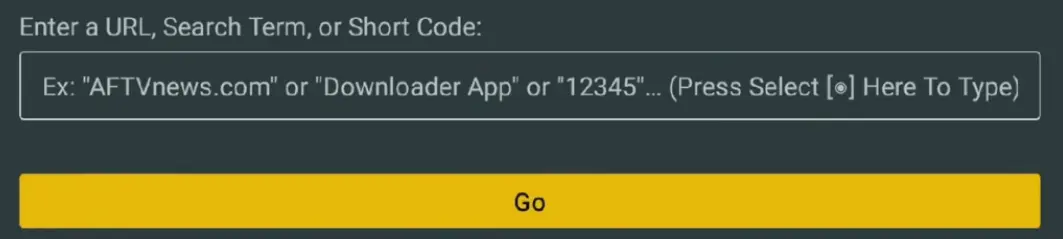
5
When it’s installed, Open application and click on Add Playlist. It’ll ask for the User Name and Password. You can give Playlist Name anything you want.
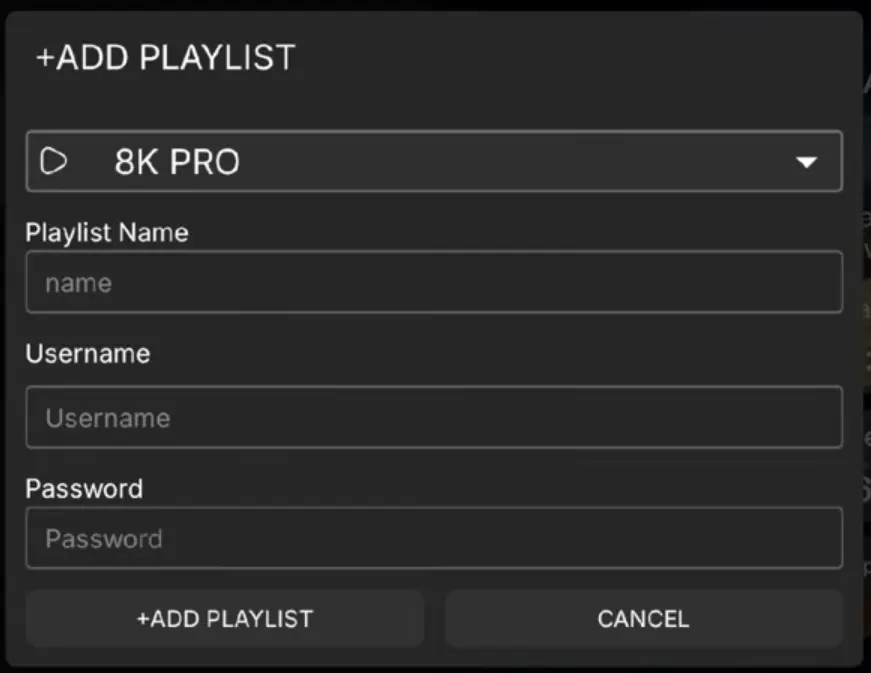
6
Enter the User Name and password that we sent you on you Email or WhatsApp.
7
Click on sign-in and it’ll load for 2-3 minutes and you’ll logged-in.
If it doesn’t show anything or show error in log-in detail then please recheck your User Name and Password
Android TV / Android Box Installation
IT takes only 3-5 Minutes to setup Android Tv or Android box IPTV.
1
Go to play store of TV or Box, and search for the “downloader”.
2
Choose downloader by Aft news. Yellow orange color app.
3
Open the downloader and put code 3157139 in the URL Search bar then click on Go. Downloading will start automatically.
4
Wait for app to download and install it.
5
Open the App and click on Add playlist. It’ll ask for User Name and Password. You can give Playlist Name anything you want.
6
Enter the User Name and password that we sent you on you Email or WhatsApp.
7
Click on sign-in and it’ll load for 2-3 minutes and you’ll logged-in.
If it doesn’t show anything or show error in log-in detail then please recheck User Name and Password
Formuler Z & Dreamlink Setup
IT takes only 3-5 Minutes to setup Android Tv or Android box IPTV.
1
Open the MyTVOnline 2 or MyTVOnline 3 app (DOL2 on Dreamlink).
2
Go to Menu → Connections → Add Portal.
3
Type any portal name you like (for example Televo).
4
Turn the “Login Required” switch ON.
5
Enter the Portal URL, Username and Password from your welcome email.
6
Press Connect to load your channels.
Smart TV (Samsung, LG, Hisense, Vizio)
In about 5 minutes, you’ll need the login details from your Email
1
Go to you app store of smart TV and search there application ibo player / IBO pro, HOT Player, Smarter pro One IPTV Player and install the app.
2
Open the application and send US Screen shot of MAC Address of application
3
We’ll add your subscription Playlist
4
After adding playlist, please restart your TV and open app.
5
After restart you’ll see live, movies, series and click on it. You’ll be logged in automatically and will get access to all channels.
6
If face any problem, contact us immediately, we’ll sort on the spot
Roku Device Setup
IT takes only 3-5 Minutes to setup Android Tv or Android box IPTV.
1
Go to app store search bar and search “IPTV Smarters Plus” & install the app.
2
Open application and send us the screen short of MAC Address
3
We’ll add your subscription Playlist
4
After adding playlist, We’ll send you the confirmation Email. Then please restart your TV and open app.
5
After restart you’ll see live, movies, series and click on it. You’ll be logged in automatically and will get access to all channels.
6
If face any problem, contact us immediately, we’ll sort on the spot
Apple — iPhone, iPad, Tablet & Apple TV
IT takes only 3-5 Minutes to setup Android Tv or Android box IPTV.
1
Go to app store, open it and search for the application “IBO Player” & install app.
2
Open application and send us the screen short of MAC Address
3
After adding playlist, We’ll send you the confirmation Email. Then please restart your TV and open app.
4
After restart you’ll see live, movies, series and click on it. You’ll be logged in automatically and will get access to all channels.
5
If face any problem, contact us immediately, we’ll sort on the spot
Windows PC & Mac Book Setup
IT takes only 3-5 Minutes to setup Android Tv or Android box IPTV.
1
Open the Microsoft store or Chrome and search “IBO Player / Pro”, Hot player OR IPTV “Smarters Pro” and Install one of them.
2
Open application and send us the screen short of MAC Address
3
After adding playlist, We’ll send you the confirmation Email. Then please restart your TV and open app.
4
Select Login with Xtream Codes API.
5
After restart you’ll see live, movies, series and click on it. You’ll be logged in automatically and will get access to all channels.
6
If face any problem, contact us immediately, we’ll sort on the spot
Android Phone Setup
IT takes only 3-5 Minutes to setup Android Tv or Android box IPTV.
1
Open the Google Play store and Search “XCiPTV Player”, XPIPTV, 9Xtream Player, OR Televizo And install any one of them.
2
Open the application and click on “Xtream code API” option
3
IIT will ask for UserName, Password and URL.
4
We’ll send you “UserName, Password and URL” via Email. These are your required credential.
5
Add detail correctly then add user or Add Playlist or sign-in.
6
It will load for 2-3 minutes and you will be logged-in. In case of any issue contact us
BuzzTV Box Setup
IT takes only 3-5 Minutes to setup Android Tv or Android box IPTV.
1
Go to your TV Home screen and select Server setting.
2
Click on API Login Xtream code
3
Give your portal any name you want.
4
It’ll ask for UserName, Password, and URL
5
We’ll send you UserName, Password and URL via Email
6
Add Log-in detail correctly. Click on connect and It’ll load and you’ll be logged in
Mag Box Setup
IT takes only 3-5 Minutes to setup Android Tv or Android box IPTV.
1
Connect your Mag box to TV.
2
Send US picture of Mac address, Written on the Mag Box.
3
We’ll add playlist on your Mag Box. After adding we’ll send you Portal URL.
4
Restart your TV, enter Portal URL correctly
5
Click on connect or save. It will load for few minutes and you will logged-in
6
If you face any problem contact us immediately.
Stuck at any point
We setup devices for the customers everyday. Share your problem with us and we’ll help you walk through the process and do the hard part for you. If you don’t understand our given process then we’ll help you setup you device from start to end.
Troubleshooting Tips

Check your internet connection. A stable connection of at least 15–20 Mbps is recommended for HD streaming.
Make sure your Xtream Codes are entered correctly. These details are case-sensitive.
Update your IPTV player app to the latest version to avoid playback and loading issues.
Restart your device and also reboot your router/modem.
Our service comes with a built-in VPN. Please disable third-party VPN apps to avoid conflicts.
Clear the cache of your IPTV player app, then reopen it and test again.
